library(tidyverse)
library(car)Latihan Pasca-Workshop
Latihan opsional untuk menguji pengetahuan dan memperkuat pemahaman Anda
Persiapan
Siapkan cheatsheet dplyr, tidyr, dan ggplot agar mudah dirujuk.
Muat paket-paket
Kode di bawah ini akan memuat paket-paket yang Anda butuhkan:
Muat dataset
Kode di bawah ini akan memuat dan menampilkan beberapa baris pertama dari dataset Duncan. Untuk mengetahui lebih lanjut tentang dataset ini, ketik ?Duncan di konsol RStudio Anda.
duncan <- as_tibble(Duncan)
print(duncan)
# A tibble: 45 × 4
type income education prestige
<fct> <int> <int> <int>
1 prof 62 86 82
2 prof 72 76 83
3 prof 75 92 90
4 prof 55 90 76
5 prof 64 86 90
6 prof 21 84 87
7 prof 64 93 93
8 prof 80 100 90
9 wc 67 87 52
10 prof 72 86 88
# ℹ 35 more rowsKode di bawah ini akan memuat dan menampilkan beberapa baris pertama dari dataset WVS. Untuk mengetahui lebih lanjut tentang dataset ini, ketik ?WVS di konsol RStudio Anda.
wvs <- as_tibble(WVS)
print(wvs)
# A tibble: 5,381 × 6
poverty religion degree country age gender
<ord> <fct> <fct> <fct> <int> <fct>
1 Too Little yes no USA 44 male
2 About Right yes no USA 40 female
3 Too Little yes no USA 36 female
4 Too Much yes yes USA 25 female
5 Too Little yes yes USA 39 male
6 About Right yes no USA 80 female
7 Too Much yes no USA 48 female
8 Too Little yes no USA 32 male
9 Too Little yes no USA 74 female
10 Too Little yes no USA 30 male
# ℹ 5,371 more rowsSoal 1
Menggunakan dataset wvs, filter kolom age untuk menyertakan nilai lebih dari 29. Kemudian, pilih kolom age, degree, religion dan poverty. Simpan hasilnya ke dataframe baru bernama wvs_filtered.
Show Answer
wvs_filtered <- wvs |>
    filter(age > 29) |>
    select(age, degree, religion, poverty)

print(wvs_filtered)
# A tibble: 4,228 × 4
age degree religion poverty
<int> <fct> <fct> <ord>
1 44 no yes Too Little
2 40 no yes About Right
3 36 no yes Too Little
4 39 yes yes Too Little
5 80 no yes About Right
6 48 no yes Too Much
7 32 no yes Too Little
8 74 no yes Too Little
9 30 no yes Too Little
10 32 yes yes Too Little
# ℹ 4,218 more rowsSoal 2
Perbarui dataset wvs dengan membuat versi dummy-coded dari variabel gender, di mana male = 0 dan female = 1. Simpan hasilnya di kolom baru bernama gender_coded.
Show Answer
wvs <- wvs |>
    mutate(gender_coded = if_else(gender == "male", 0, 1))

print(wvs)
# A tibble: 5,381 × 7
poverty religion degree country age gender gender_coded
<ord> <fct> <fct> <fct> <int> <fct> <dbl>
1 Too Little yes no USA 44 male 0
2 About Right yes no USA 40 female 1
3 Too Little yes no USA 36 female 1
4 Too Much yes yes USA 25 female 1
5 Too Little yes yes USA 39 male 0
6 About Right yes no USA 80 female 1
7 Too Much yes no USA 48 female 1
8 Too Little yes no USA 32 male 0
9 Too Little yes no USA 74 female 1
10 Too Little yes no USA 30 male 0
# ℹ 5,371 more rowsSoal 3
Buat ringkasan dari dataset wvs yang menampilkan jumlah observasi untuk setiap negara.
Show Answer
wvs |>
    count(country)
# A tibble: 4 × 2
country n
<fct> <int>
1 Australia 1874
2 Norway 1127
3 Sweden 1003
4 USA 1377Soal 4
Menggunakan dataset wvs, hitung rata-rata age untuk setiap kombinasi gender dan status gelar.
Show Answer
wvs |>
    group_by(gender, degree) |>
    summarise(avg_age = mean(age, na.rm = TRUE))
`summarise()` has grouped output by 'gender'. You can override using the
`.groups` argument.# A tibble: 4 × 3
# Groups: gender [2]
gender degree avg_age
<fct> <fct> <dbl>
1 female no 45.6
2 female yes 41.0
3 male no 46.0
4 male yes 43.3Soal 5
Menggunakan dataset wvs, buat statistik ringkasan untuk setiap negara dan agama (yes/no). Hitung age mean, age median, dan jumlah observasi.
Show Answer
wvs |>
    group_by(country, religion) %>%
    summarise(
        avg_age = mean(age, na.rm = TRUE),
        median_age = median(age, na.rm = TRUE),
        n_observations = n()
    )
`summarise()` has grouped output by 'country'. You can override using the
`.groups` argument.# A tibble: 8 × 5
# Groups: country [4]
country religion avg_age median_age n_observations
<fct> <fct> <dbl> <dbl> <int>
1 Australia no 39.9 37 375
2 Australia yes 45.7 43 1499
3 Norway no 40.6 38 109
4 Norway yes 43.6 42 1018
5 Sweden no 43.7 42 15
6 Sweden yes 43.9 43 988
7 USA no 44.6 42 287
8 USA yes 48.9 46 1090Soal 6
Menggunakan dataset wvs, pilih 10 responden tertua dari USA. (petunjuk: arrange() dan slice())
Show Answer
wvs |>
    filter(country == "USA", age > 50) |>
    arrange(desc(age)) |>
    slice(1:10)
# A tibble: 10 × 7
poverty religion degree country age gender gender_coded
<ord> <fct> <fct> <fct> <int> <fct> <dbl>
1 Too Much no no USA 91 male 0
2 Too Little yes no USA 91 male 0
3 Too Much yes no USA 88 female 1
4 About Right yes no USA 88 male 0
5 Too Little yes yes USA 87 female 1
6 Too Much yes no USA 87 female 1
7 Too Little yes no USA 87 male 0
8 About Right yes no USA 87 male 0
9 About Right yes no USA 86 female 1
10 Too Much yes no USA 86 female 1Soal 7
Perbarui dataset wvs dengan menambahkan kolom baru bernama age_category yang mengkategorikan setiap responden berdasarkan kriteria berikut:
- below 18 = “youth” category
- between 18 to 34 = “young adult” category
- between 35 to 49 = “adult” category
- between 50 to 69 = “senior” category
- more than 70 = “elderly” category
Show Answer
wvs <- wvs |>
    mutate(age_category = case_when(
        age < 18 ~ "youth",
        age >= 18 & age < 35 ~ "young adult",
        age >= 35 & age < 50 ~ "adult",
        age >= 50 & age < 70 ~ "senior",
        age >= 70 ~ "elderly"
    ))

print(wvs)
# A tibble: 5,381 × 8
poverty religion degree country age gender gender_coded age_category
<ord> <fct> <fct> <fct> <int> <fct> <dbl> <chr>
1 Too Little yes no USA 44 male 0 adult
2 About Right yes no USA 40 female 1 adult
3 Too Little yes no USA 36 female 1 adult
4 Too Much yes yes USA 25 female 1 young adult
5 Too Little yes yes USA 39 male 0 adult
6 About Right yes no USA 80 female 1 elderly
7 Too Much yes no USA 48 female 1 adult
8 Too Little yes no USA 32 male 0 young adult
9 Too Little yes no USA 74 female 1 elderly
10 Too Little yes no USA 30 male 0 young adult
# ℹ 5,371 more rowsSoal 8
Buat ulang visualisasi berikut:
Show Answer
wvs |> ggplot(aes(x = country, fill = poverty)) +
    geom_bar(position = "dodge") +
    labs(title = "Distribution of Poverty Opinions Across Countries",
       x = "Country",
       y = "Count",
       fill = "Poverty Opinion") +
theme_minimal() 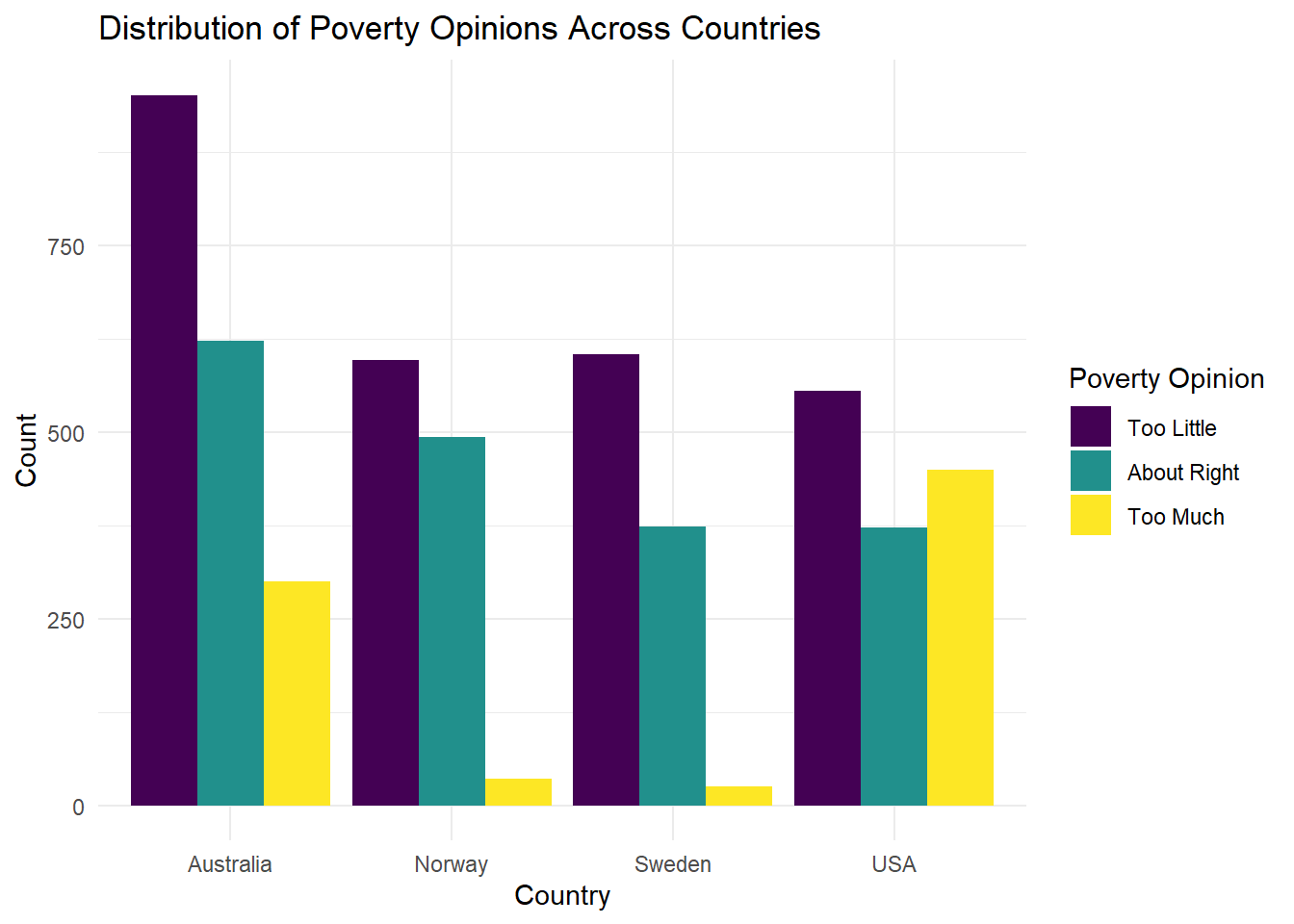
Soal 9
Buat ulang visualisasi berikut:
Show Answer
wvs |>
    ggplot(aes(x = country, fill = degree)) +
    geom_bar(position = "fill") +
    labs(title = "Proportion of Degree Status by Country",
       x = "Country", y = "Count", fill = "Degree Status") +
    theme_minimal()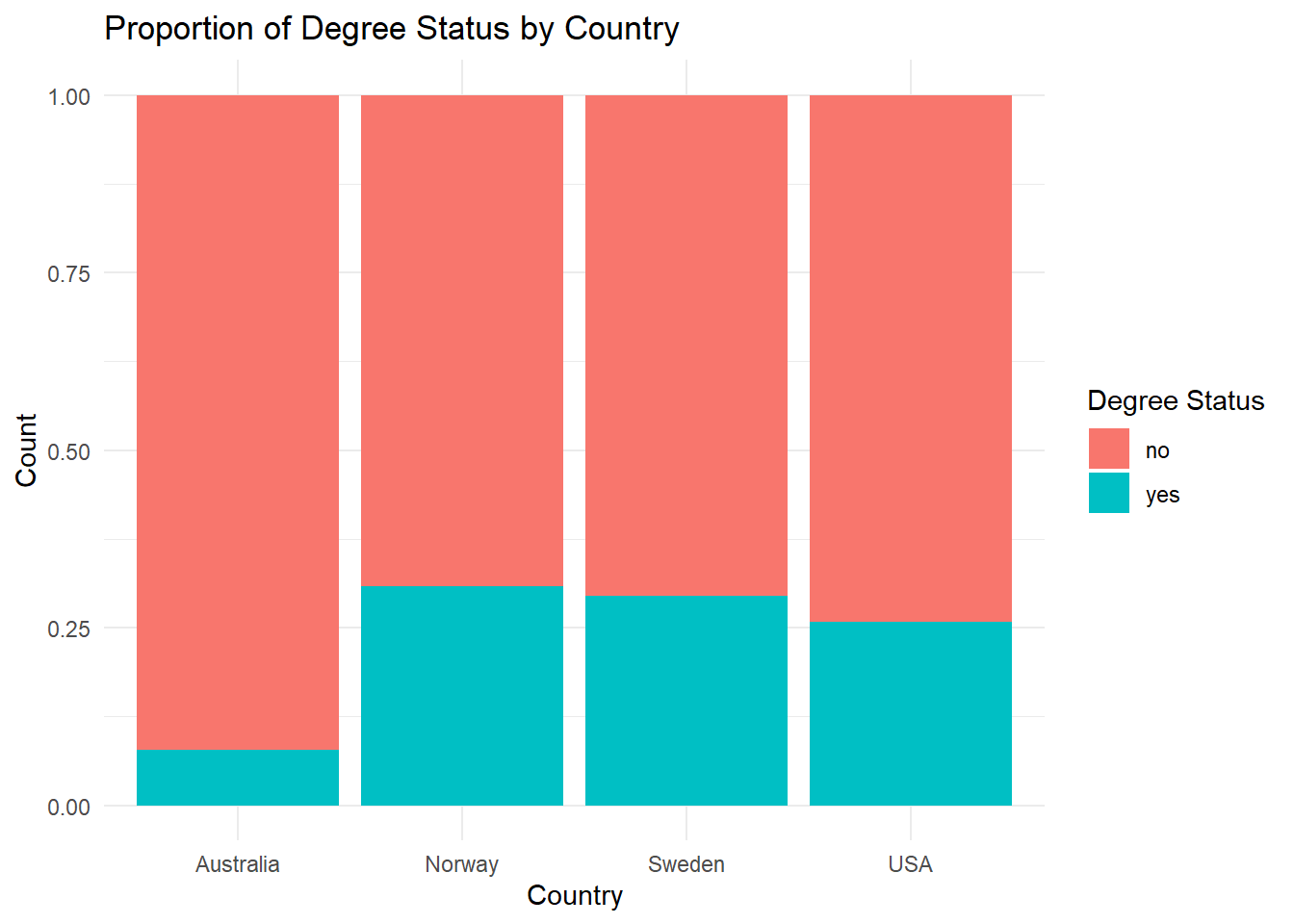
Soal 10
Buat ulang visualisasi berikut:
Show Answer
wvs |> ggplot(aes(x = country, y = age)) +
    geom_boxplot() +
    labs(title = "Age Distribution by Country", x = "Country", y = "Age") +
    theme_minimal() +
    theme(legend.position = "none")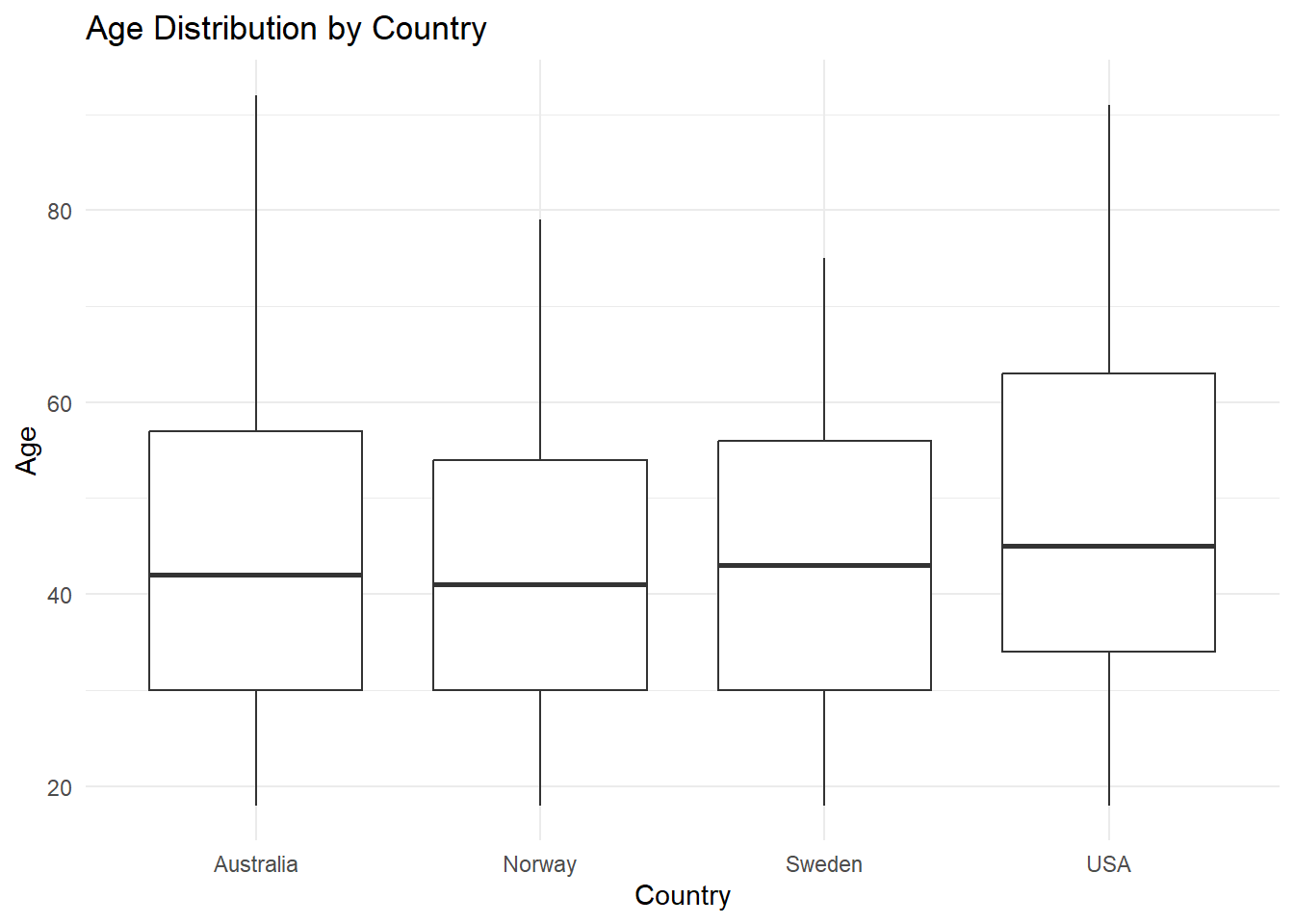
Soal 11
Buat ulang visualisasi berikut:
Show Answer
wvs |>
    ggplot(aes(x = country, y = age)) +
    geom_boxplot() +
    facet_wrap(~ religion) +
    labs(title = "Age Distribution by Country and Religion",
       x = "Country", y = "Age") +
theme_minimal() 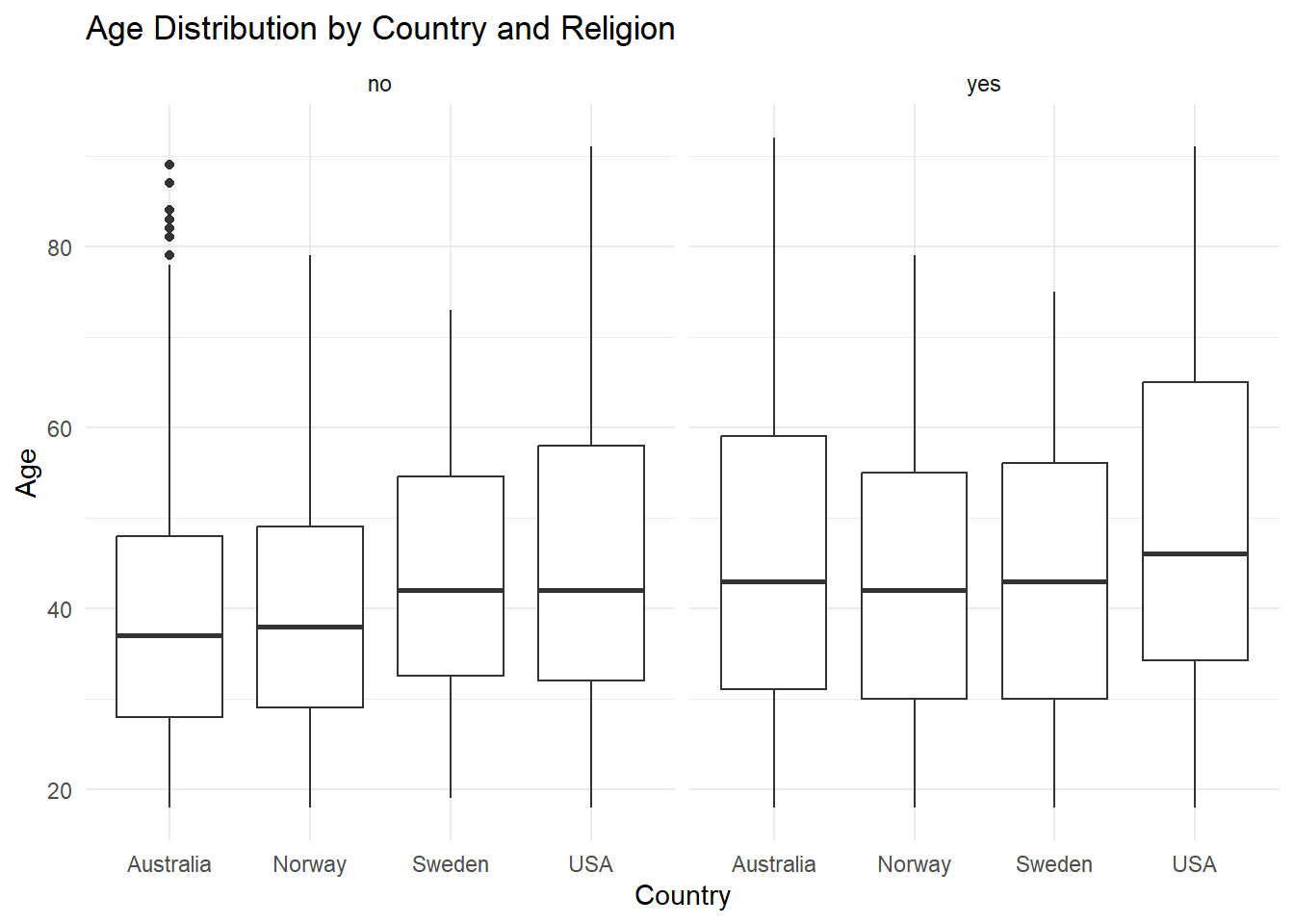
Soal 12
Buat ulang visualisasi berikut menggunakan dataset duncan:
Show Answer
duncan |>
    ggplot(aes(x = income, y = prestige, color = type)) +
    geom_jitter() +
    labs(title = "Occupation Prestige vs. Income",
       x = "Income",
       y = "Prestige Score",
       color = "Occupation Type") +
    theme_minimal()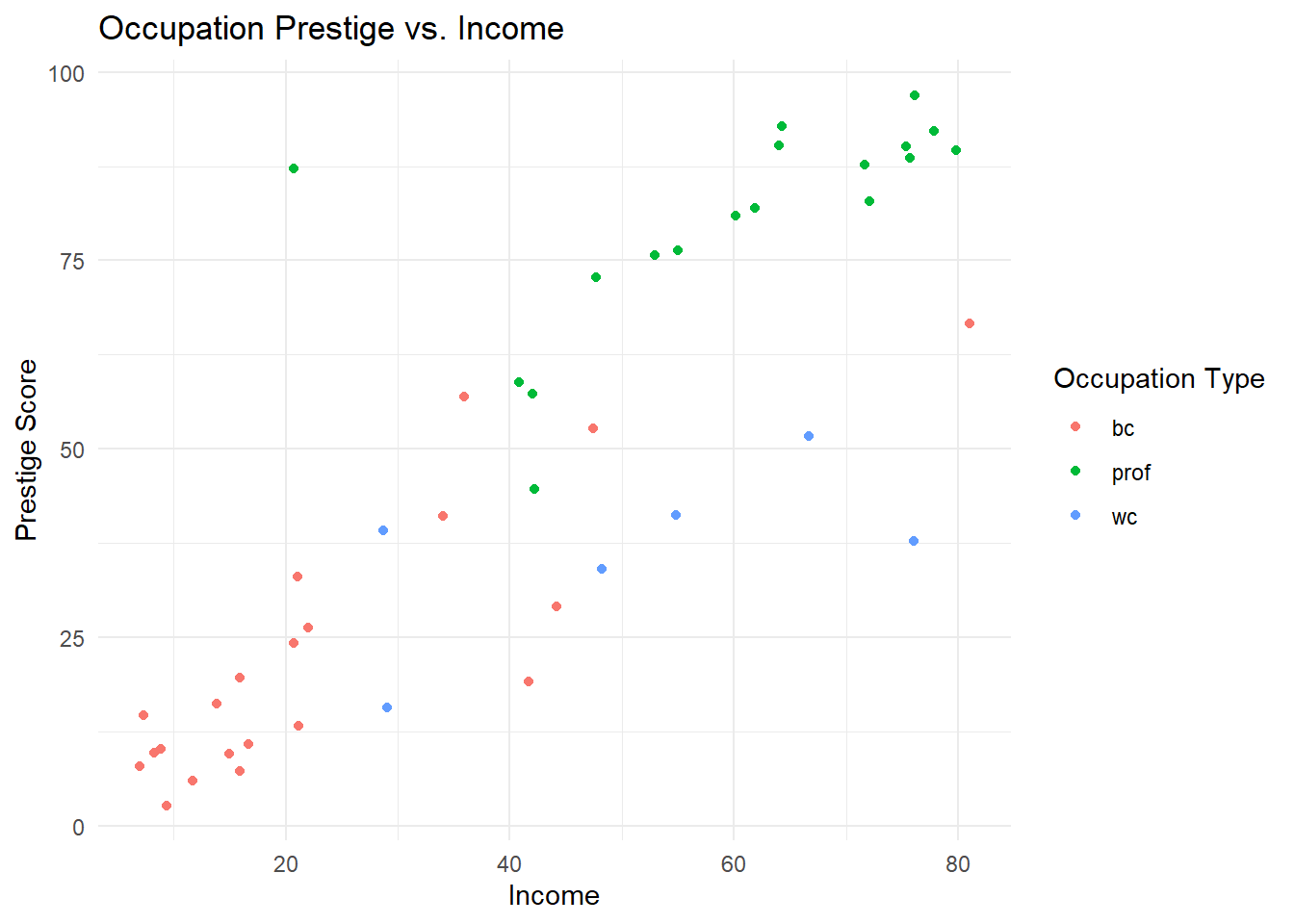
Soal 13
Buat ulang visualisasi berikut menggunakan dataset duncan:
Show Answer
duncan |>
    ggplot(aes(x = type, y = income)) +
    geom_boxplot() +
    labs(title = "Income Distribution by Occupation Type",
        x = "Occupation Type",
        y = "Income") +
    theme_minimal()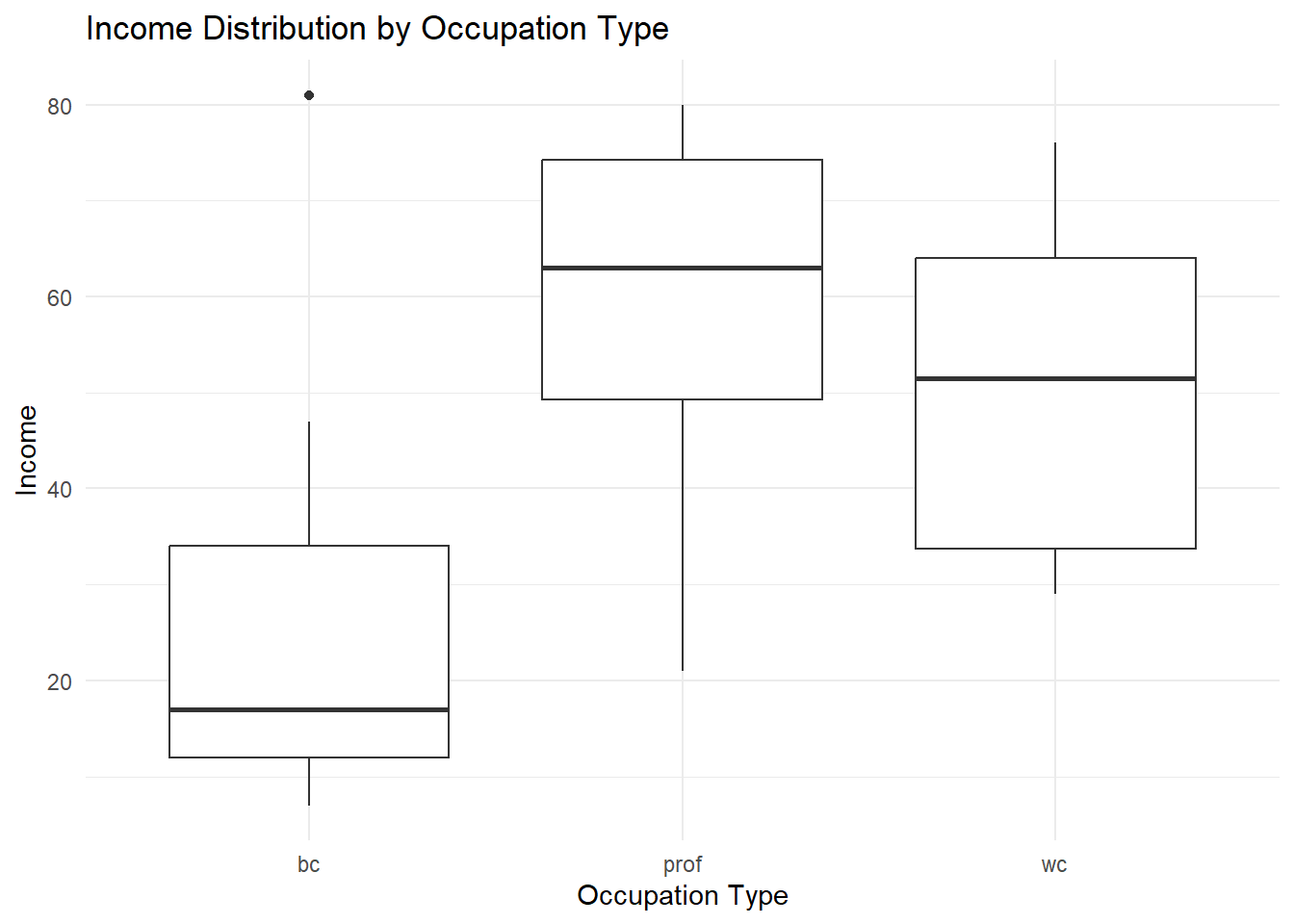
Soal 14
Buat ulang visualisasi berikut menggunakan dataset duncan:
Show Answer
duncan |>
    ggplot(aes(x = prestige, y = income, color = type)) +
    geom_jitter() +
    geom_smooth(method = "lm") +
    labs(
        title = "Relationship between Prestige and Income",
        subtitle = "Grouped by Occupation Type",
        x = "Prestige Score",
        y = "Income",
        color = "Occupation Type"
    ) +
    theme_minimal()
`geom_smooth()` using formula = 'y ~ x'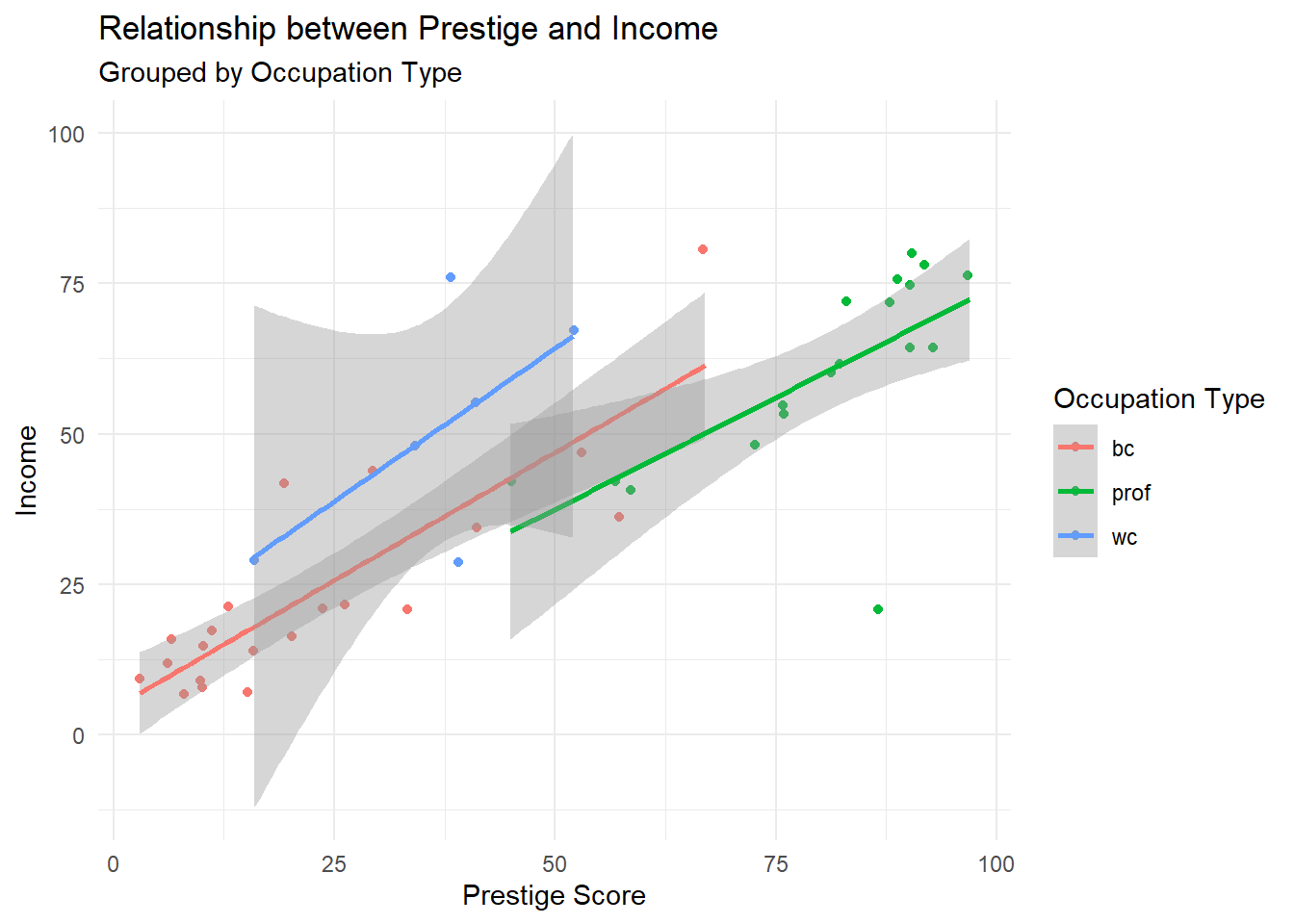
Soal 15
Menggunakan dataset duncan:
- Periksa korelasi antara skor
prestigedaneducation. - Analisis hubungan antara
incomedan skorprestige.
Show Answer
cor.test(duncan$prestige, duncan$education)
    Pearson's product-moment correlation

data:  duncan$prestige and duncan$education
t = 10.668, df = 43, p-value = 1.171e-13
alternative hypothesis: true correlation is not equal to 0
95 percent confidence interval:
 0.7445746 0.9163112
sample estimates:
      cor
0.8519156
Show Answer
cor.test(duncan$prestige, duncan$income)
    Pearson's product-moment correlation

data:  duncan$prestige and duncan$income
t = 10.062, df = 43, p-value = 7.144e-13
alternative hypothesis: true correlation is not equal to 0
95 percent confidence interval:
 0.7217665 0.9080298
sample estimates:
      cor
0.8378014
Soal 16
Menggunakan dataset duncan, bandingkan skor prestige antar kategori pekerjaan yang berbeda menggunakan ANOVA.
Show Answer
duncan_anova <- aov(prestige ~ type, data=duncan)
summary(duncan_anova)
Df Sum Sq Mean Sq F value Pr(>F)
type 2 33090 16545 65.57 1.21e-13 ***
Residuals 42 10598 252
---
Signif. codes: 0 '***' 0.001 '**' 0.01 '*' 0.05 '.' 0.1 ' ' 1Soal 17
Menggunakan dataset duncan, buat model regresi yang memprediksi income berdasarkan skor prestige dan education.
library(huxtable)Show Answer
duncan_model <- lm(income ~ prestige + education, data = duncan)
huxreg("income" = duncan_model)| income | |
|---|---|
| (Intercept) | 10.426 * |
| (4.164) | |
| prestige | 0.624 *** |
| (0.125) | |
| education | 0.032 |
| (0.132) | |
| N | 45 |
| R2 | 0.702 |
| logLik | -179.902 |
| AIC | 367.805 |
| *** p < 0.001; ** p < 0.01; * p < 0.05. | |
Soal 18
Menggunakan dataset wvs, periksa hubungan antara religion dan persepsi poverty.
Show Answer
wvs_chisq <- chisq.test(table(wvs$religion, wvs$poverty))
print(wvs_chisq)
    Pearson's Chi-squared test

data:  table(wvs$religion, wvs$poverty)
X-squared = 0.083005, df = 2, p-value = 0.9593
Soal 19
Menggunakan dataset wvs, periksa apakah ada perbedaan signifikan dalam rata-rata usia antara individu dengan dan tanpa gelar universitas.
Show Answer
wvs_ttest <- t.test(age ~ degree, data = wvs)
print(wvs_ttest)
    Welch Two Sample t-test

data:  age by degree
t = 7.0571, df = 2029, p-value = 2.325e-12
alternative hypothesis: true difference in means between group no and group yes is not equal to 0
95 percent confidence interval:
 2.674321 4.732708
sample estimates:
 mean in group no mean in group yes
         45.82775          42.12423
Soal 20
Menggunakan dataset wvs, bandingkan rata-rata usia antar negara dan kategori usia yang berbeda (lihat Soal 7 untuk membuat age_category), dan selidiki apakah ada perbedaan signifikan. Lakukan uji post-hoc jika diperlukan.
Show Answer
wvs_anova <- aov(age ~ country + age_category, data = wvs)
summary(wvs_anova)
Df Sum Sq Mean Sq F value Pr(>F)
country 3 17399 5800 235.9 <2e-16 ***
age_category 3 1424858 474953 19319.9 <2e-16 ***
Residuals 5374 132113 25
---
Signif. codes: 0 '***' 0.001 '**' 0.01 '*' 0.05 '.' 0.1 ' ' 1